VS Code 1.142 progressively makes Copilot the default agent harness
The release restores read-only Ask, adds preview Canvases and lets eligible Codex chats move between folders without rebuilding conversation history.
By BenchdictPublished Oct 31, 20264 min read
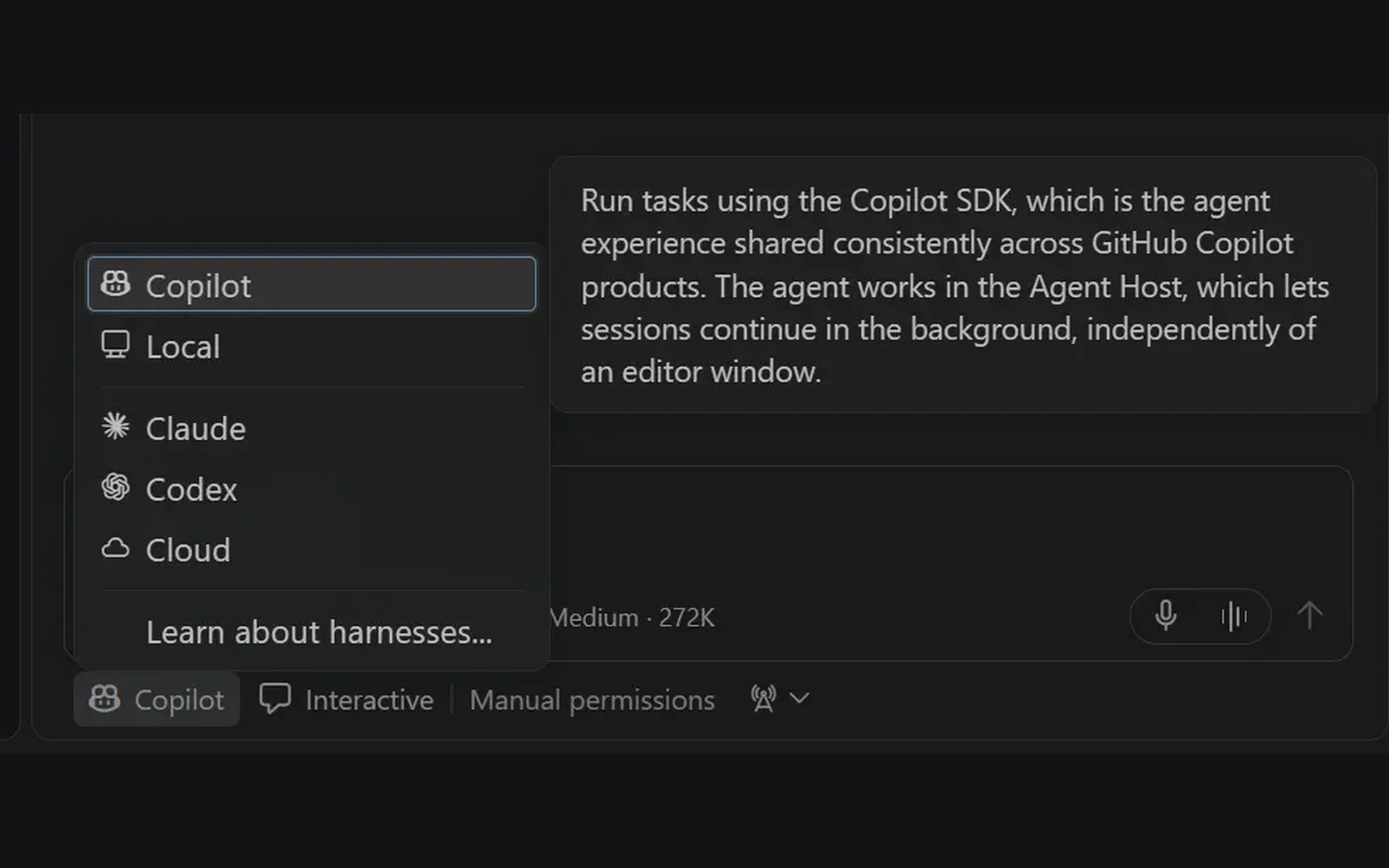
VS Code 1.142, released Oct. 14 according to the VS Code updates page, is progressively making the Copilot harness the default for new agent sessions, Microsoft says. The rollout does not mean every installation has switched or every agent feature works across harnesses.
Read this as a default change, not a new runtime: the Agent Host predates 1.142, and Microsoft's own wording describes a progressive rollout, narrower than coverage calling Copilot already the default. The details that matter are the boundaries — harness and model choice stay separate, the restored Ask agent is read-only, background sessions still end when the app quits, and moving a conversation is a Codex-only capability. For most users the practical change today is small; it grows only as the default reaches existing sessions.
Key facts
- Released
- October 14, 2026, according to the VS Code updates page.
- Default rollout
- Copilot progressively becomes the harness for new sessions.
- Ask
- The built-in Copilot agent uses read-only tools.
- Canvases
- Preview is limited to desktop local Copilot harness sessions.
- Chat moves
- Codex harness or Codex in Interactive mode; one chat and one local folder.
- Background sessions
- Desktop-managed Agent Host sessions require VS Code to remain running.
A default change, not a new runtime
Previously, users could select the Copilot harness through the chat input’s harness picker. Microsoft’s release notes now describe a progressive shift toward using it by default for new sessions. That distinction matters: secondary coverage from Warp2Search describes Copilot as already the default, while Microsoft’s narrower wording leaves the rollout unfinished.
The underlying Agent Host predates this release. Help Net Security covered the dedicated host in July, associating it with VS Code 1.129 and describing support for Copilot, Claude and Codex. The change in 1.142 is therefore about which harness new sessions receive, rather than the introduction of a dedicated agent process.
Microsoft says Copilot harness sessions use the Copilot SDK and can continue in the background, with access from either the editor or the Agents window. Its documentation adds an operational boundary: desktop-managed sessions still require the VS Code application to remain running. Background execution is not a promise that work survives quitting the application.

Model choice and harness choice remain separate
Microsoft says the redesigned model picker supports switching between Copilot and bring-your-own-key contributed models, alongside controls for effort levels and context windows. But changing a model or agent role does not change a session’s harness, according to its documentation.
That separation explains why the release’s features do not form one interchangeable package. Microsoft says the restored Ask agent in the Copilot harness uses only read-only tools: it cannot edit files or run state-changing commands. Canvases, which provide a shared interactive artifact beside chat, are a preview restricted to desktop local sessions using that harness. Each canvas also requires a canvas extension.
For developers moving between agent products, Microsoft explicitly cautions that a shared SDK runtime does not guarantee identical tools, models, permissions, customizations or synchronization.
Moving a conversation is a different capability
Microsoft says the Agents window can move an eligible chat to another folder or a new Git worktree while preserving conversation history. Previously, continuing in another location required starting a new chat and rebuilding context.
Microsoft limits moves to the Codex harness or Codex in Interactive mode, with one chat and one local folder. It is not a general benefit of the Copilot default rollout. Microsoft says subsequent edits and commands run in the destination while the original checkout remains unchanged.
For teams, the release also highlights sandboxing and permission policies, including controls over available permission modes. Those are administrative capabilities, not evidence of a measured security improvement.
Who is affected
Microsoft’s stated boundaries split the audience: users starting new sessions may receive Copilot by default, desktop users running local Copilot sessions are eligible for preview Canvases, and eligible Codex users can relocate chats. Enterprise administrators get controls over sandboxing and permission policies, while people running desktop-managed Agent Host sessions must keep VS Code running—even when closing an editor window.
Sources
- Visual Studio Code 1.142Docscode.visualstudio.com, Oct 20, 2026.What we took from it: First-party release date, progressive rollout, previous harness selection, Copilot SDK, Ask, Canvases, model picker, enterprise controls and Codex relocation conditions.
- Choose an agent harnessDocscode.visualstudio.com, Oct 20, 2026.What we took from it: Desktop application lifetime requirement, read-only Ask restrictions, distinction between models and harnesses, and limits on cross-product SDK parity.
- Visual Studio Code 1.142 Release: Copilot Becomes the Default Agent HarnessIndependentWarp2Search, Oct 15, 2026.What we took from it: Secondary coverage whose completed-default wording contrasts with Microsoft’s progressive-rollout statement; not treated as corroboration.
- VS Code agent host runs Copilot, Claude, and Codex in a dedicated process - Help Net SecurityIndependentHelp Net Security, Jul 16, 2026.What we took from it: Earlier reporting linking the dedicated Agent Host to VS Code 1.129 and describing Copilot, Claude and Codex support.
Benchdict, Edited and published by Jason, Editor & Publisher. Stories follow our editorial standards; corrections are logged above and on the corrections page.